

Meetings
Meetings with notes that cite their source
Before recording, Talo requires you to notify attendees: copy a chat message or a line to read out loud. A private meeting, or one without a confirmed project, never reaches an AI agent.
Transcription appears live, locally, on this Mac. On the right, a copilot (collapsed by default) only speaks up when the project's memory, documents or tasks can answer with a real source; if nothing backs it up, it doesn't invent an answer.
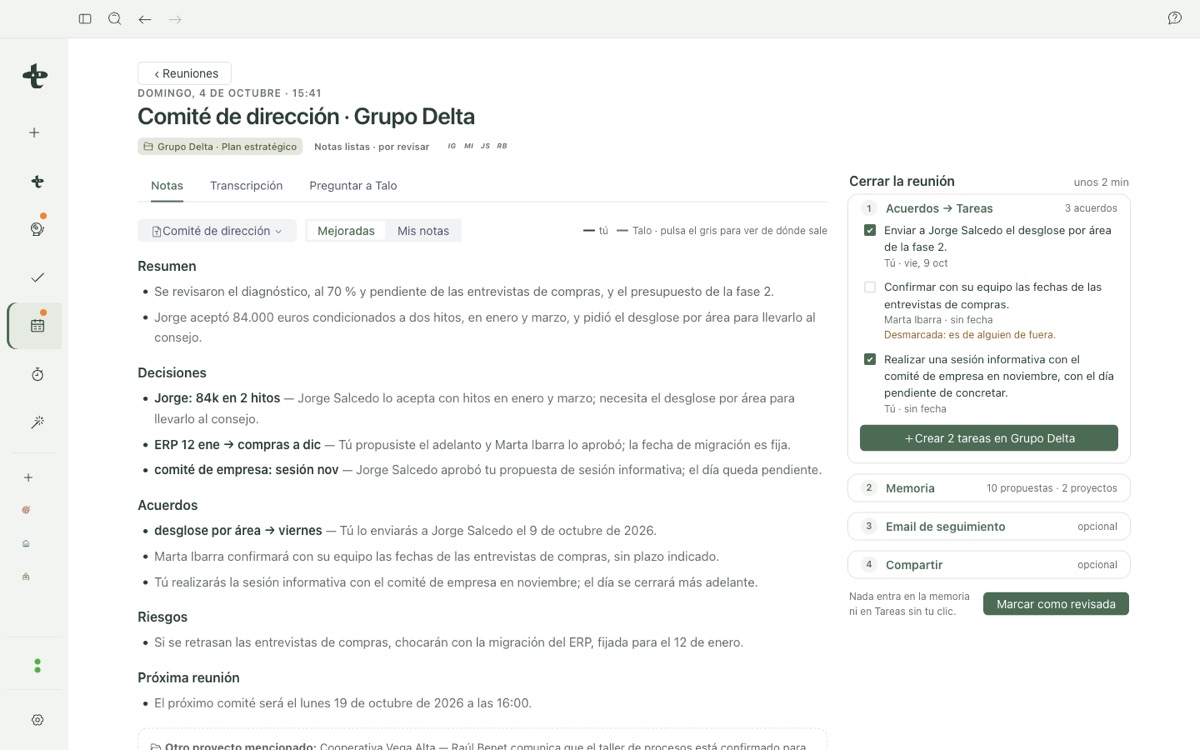
When you finish, Talo generates notes from a template: what you wrote appears as-is, what Talo adds is visually distinct, and every citation links to the exact transcript sentence. Audio is never kept.
Memory
Per-project memory, with checkable citations
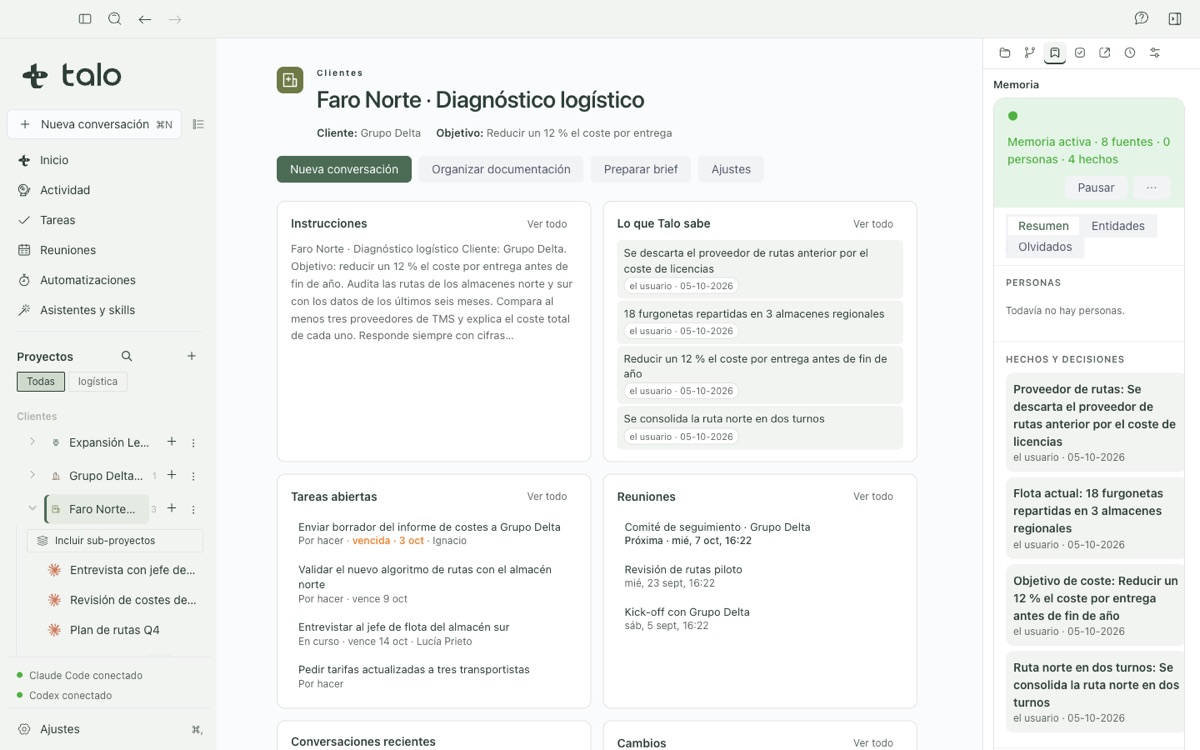
Talo locally indexes each project's files and conversations to recall people, facts and decisions. When an answer uses memory, every citation opens a card with the exact source, its date and the fragment used.
Before indexing a file, Talo looks for credential patterns and replaces them with "[secret omitted]": that text never reaches the index or the agent.
You can confirm, edit or forget any fact. A project's memory is its own by default; a chat with no project only looks at other projects with your explicit consent.
Charts
Interactive charts in the chat
Ask for a chart and it appears in the answer, built from your project's data: budget by phase against spend, the project status traffic light, the risk matrix, the Gantt with its critical path or the stakeholder map. Each one has "View data" and exports to Excel or an image.
They are not pictures: you can touch them. Click a risk and see the quote it comes from; move the weights of a decision matrix and the winning option changes instantly; move the sliders of a "what if…" and the result is recalculated on your Mac, with a closed formula engine that never runs the agent's code.
Nothing is written on its own: "Create tasks" from a checklist or "Save to People" from the stakeholder map show you exactly what will change first, and only write if you approve.
People
A people directory, without mixing projects
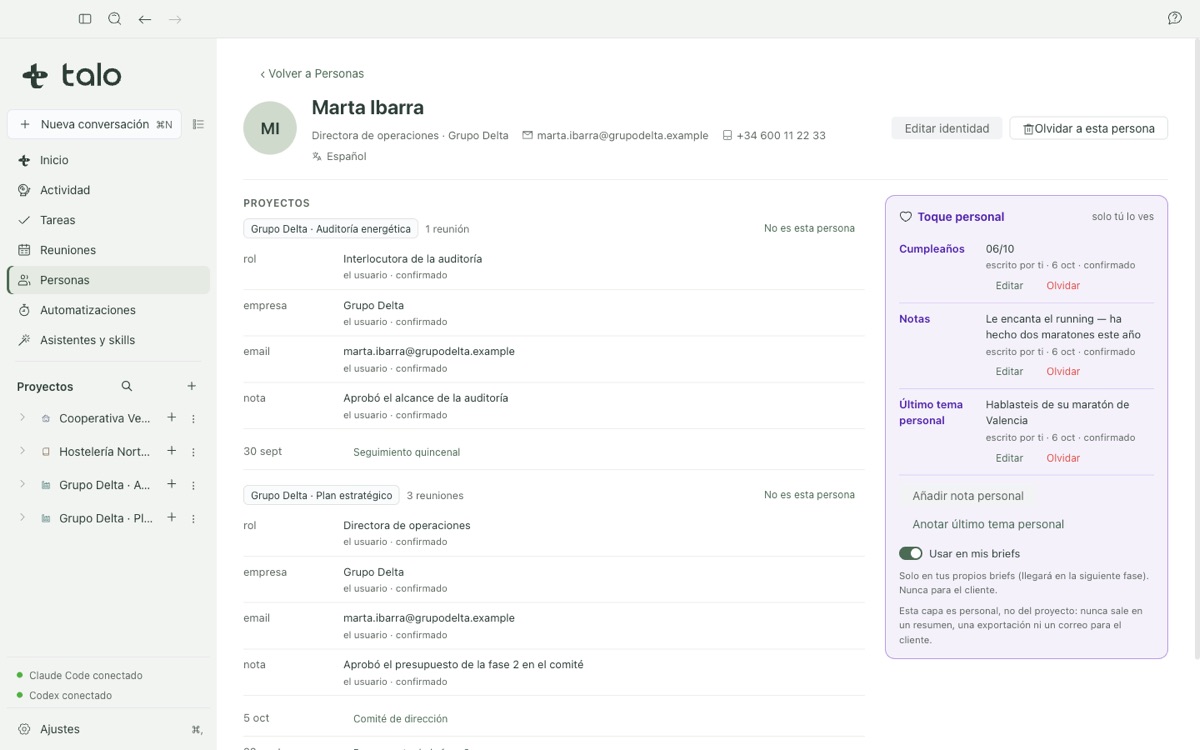
Every profile has three layers: identity (shared across projects), a personal touch (birthdays and notes, visible only to you), and what each project's own memory knows about them, with its source.
If Talo detects that a person in one project might be the same as someone already in your directory, it asks you: it never decides on its own. And one project never sees another project's data: a profile shows one project at a time.
A sensitive fact (health, religion, ideology, union membership) is marked "outside the AI" and never reaches an agent or a briefing, even though it stays saved on the profile.
Import
Import a recording you already had
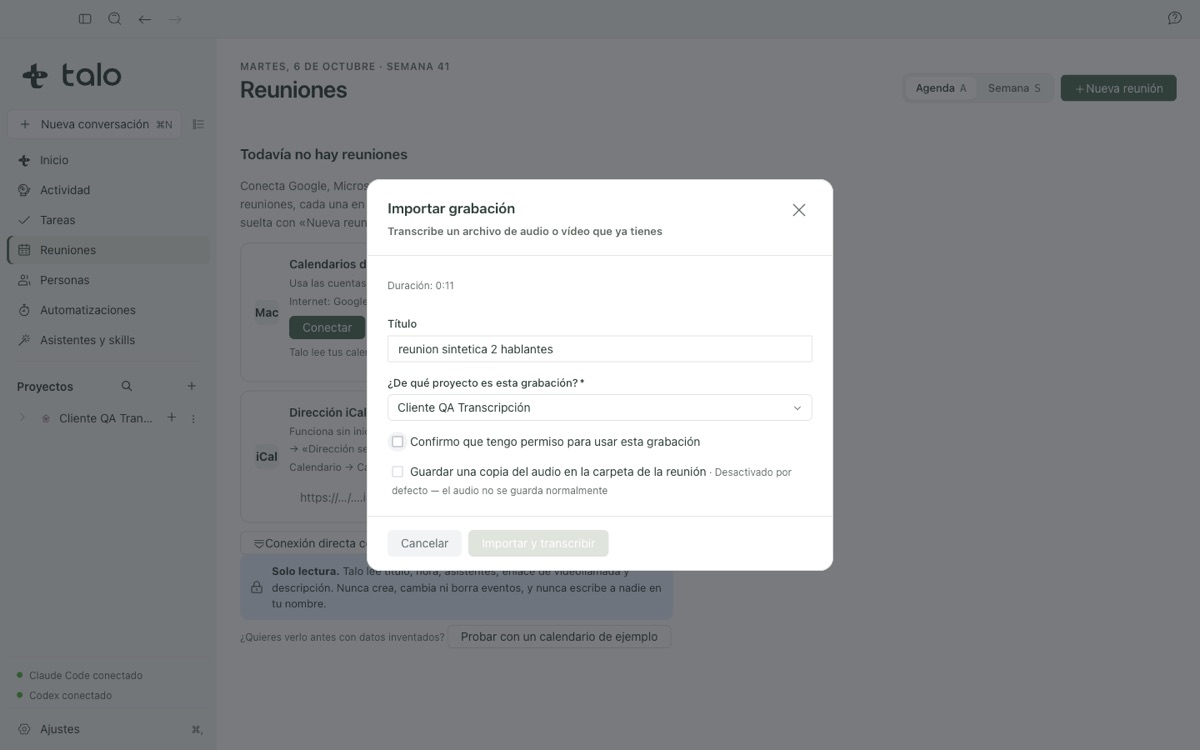
If you already have the audio or video of a meeting recorded with another app (m4a, mp3, wav, mp4, mov, webm…), Talo transcribes it on this Mac with the same local engine Live Meetings uses, with speaker separation.
An imported meeting follows the same path as a live one: automatic notes, meeting close-out, memory and search.
Talo also imports a folder or .zip you already had as a new project: it copies, never moves, the original, and lets you review every candidate file before bringing anything in.
Browser
A browser that asks permission for every action
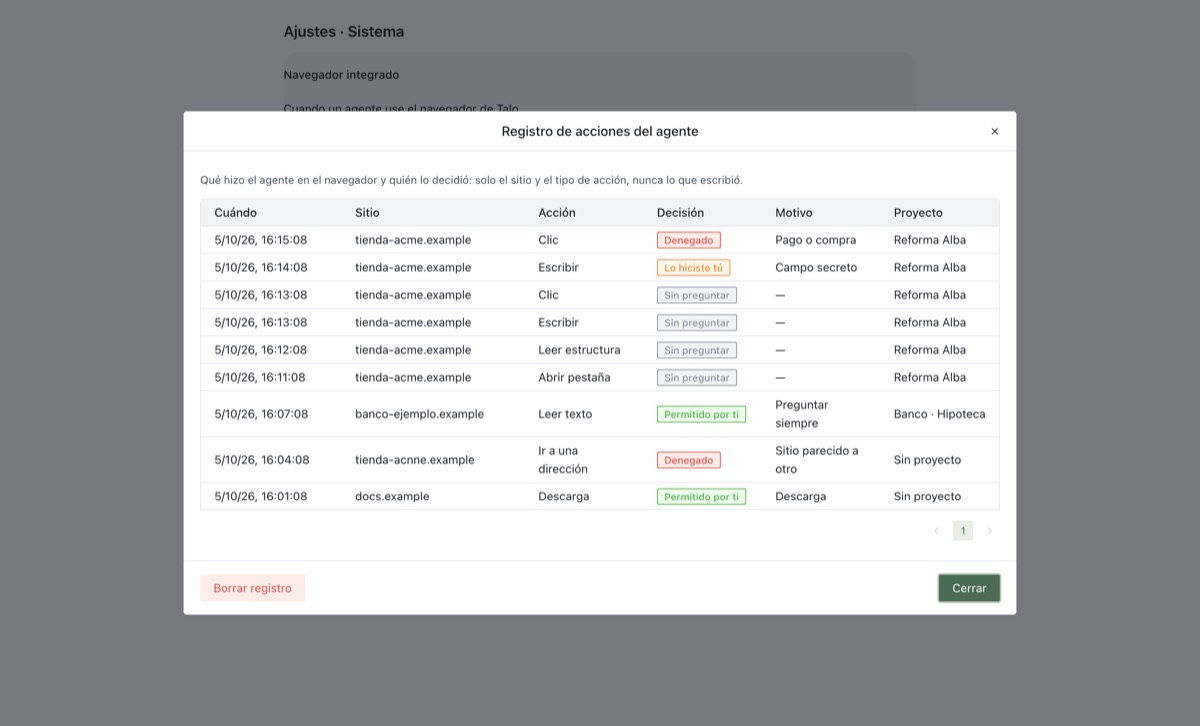
Talo ships with a browser inside the app, with a separate session per project. Your agent can use it too, but only when you allow it, action by action: reading a page, typing into a field or downloading something each triggers an explicit prompt.
For a login or a payment, the agent can ask you to take control: it tells you the domain, lets you type the password yourself, and you can hand control back with a note when you're done.
Every prompt describes the action in plain words and never shows what's inside a password field; if the page changes between your approval and the action running, Talo cancels instead of risking it.
Dictation
Local dictation in chat, no cloud
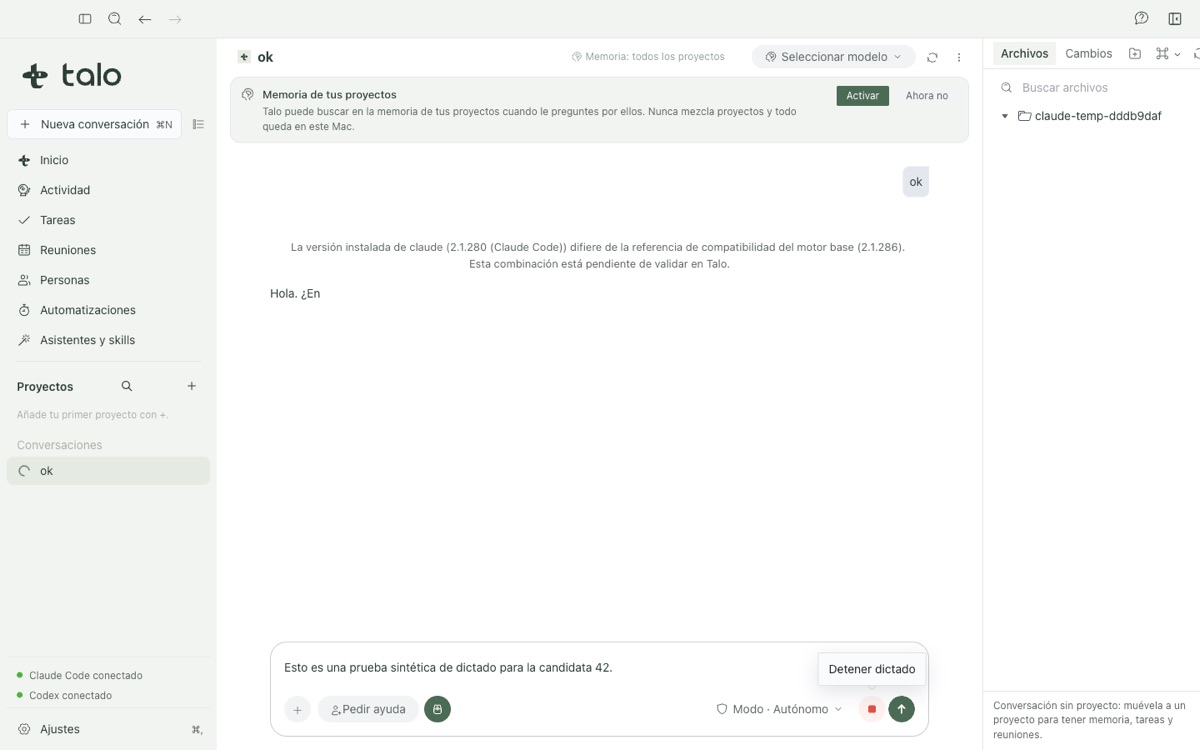
The microphone button in the composer dictates text with the same local voice engine that transcribes your meetings: never an external speech-to-text cloud.
The text is added to the input box; it never sends the message for you: you review it and press send whenever you're ready.
A dictation session never produces a file (no saved transcript, no diary, no debug audio) and it shares the same microphone permission (and the same usage queue) as Meetings, so the two features never collide.
Documents
Review a document and send your comments to the agent
"Review with Talo" opens a layer over whatever you are reading: a PDF, a Mermaid diagram, a CSV sheet, the built-in browser, or the Word/Excel/PowerPoint reading view. Draw with the pencil, highlighter, arrow or rectangle, and pin a comment to a point or an area.
"Send to Talo" attaches a marked-up screenshot, with numbered comments, to the conversation: the agent sees exactly what you pointed at, never just "look at the document". With no active conversation, Talo says so and does not mark the review as sent.
Annotation drafts are saved in Talo's local profile, not inside the file or the project folder; they do not travel to another Mac on their own. Sending a review does transmit the screenshot and comment text to whichever agent provider you have connected.
And also
More pieces of the same desk
Features already tested in the same signed build, without a dedicated screenshot on this page yet.
-
Projects and files
Every project lives in its own folder, with a brief, a TALO.md context file and a file explorer.
-
Documents, diagrams and whiteboard
An editor with Mermaid diagrams and a whiteboard with draft recovery; "Review with Talo" sends any view to the agent with your comments.
-
Tasks
TABLERO.md boards compatible with the Obsidian Kanban plugin, plus "My week" on Home.
-
Reviewed automations
Scheduled or event-triggered tasks that Talo runs on an isolated copy of the project and presents for your review before applying anything.
-
Skills and MCP tools
A Spanish-language skill catalog installable in one click, and MCP server onboarding from the official registry, always with human review.
-
Cloud folders
Detects iCloud Drive, Google Drive, OneDrive and Dropbox in read-only mode, and lets you "Publish" a new copy without overwriting the original.


Try Talo on your Mac
Private beta for Apple Silicon Macs, signed and notarized by Apple. Your work stays on your Mac.